Manusly Cloud + Offline Models
Managed cloud AI for speed and quality, plus local offline models for privacy-first workflows and assisted writing.
- Chat + writing suggestions provider selection
- Offline fallback support
A powerful, modern LaTeX editor built by a researcher for researchers and professional writers. Manusly combines PDF preview, Git and Zotero workflows, cloud collaboration, and AI assistance with Manusly Cloud or offline local models. Available on Windows, macOS, and Linux.
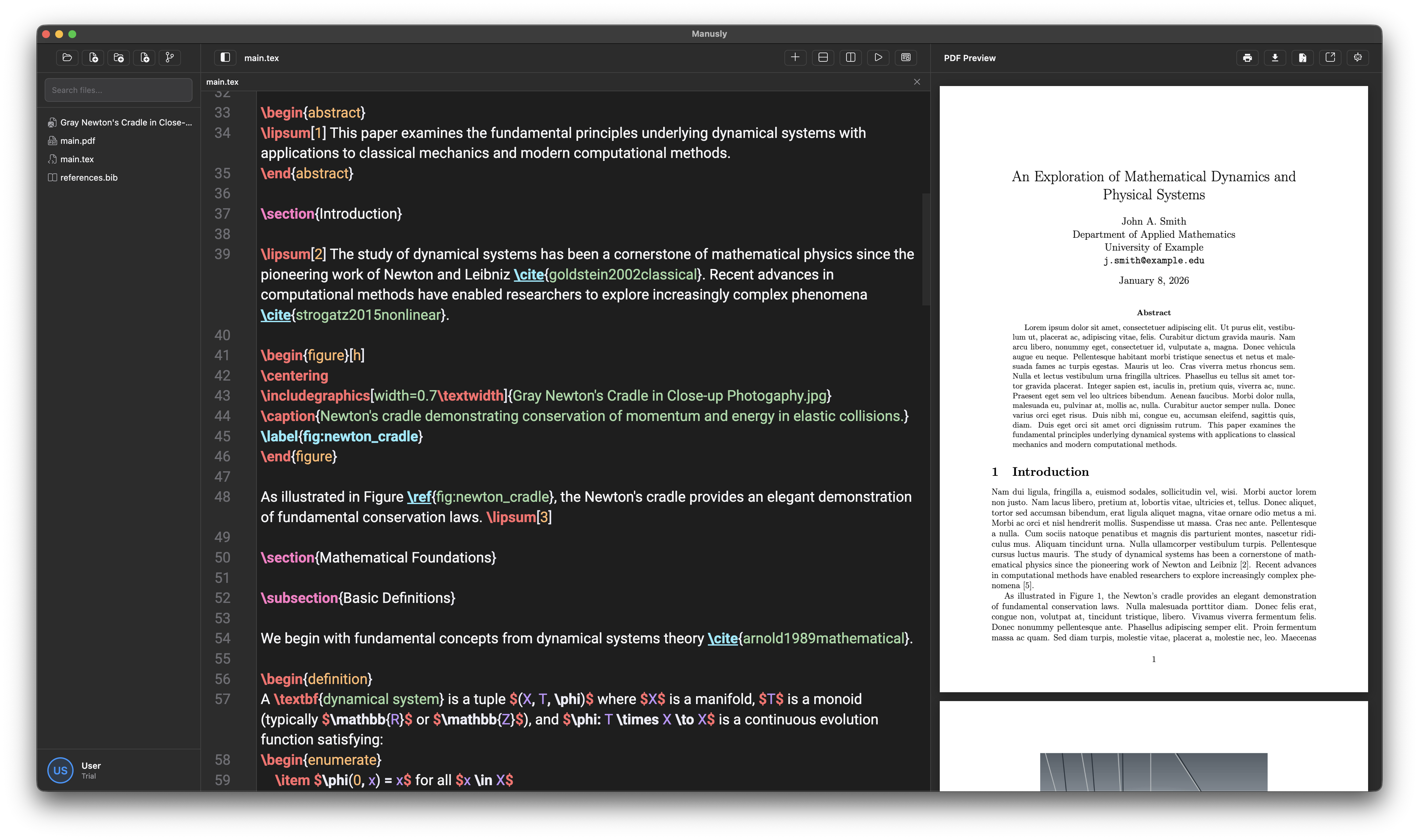
Everything you need for professional LaTeX editing
Managed cloud AI for speed and quality, plus local offline models for privacy-first workflows and assisted writing.
Compile your project to refresh the PDF preview, with the option to detach the preview into its own window.
Invite owners, editors, and viewers to cloud projects with plan-aware collaboration limits.
Configure identity, manage SSH keys, and handle merge conflicts without leaving the editor.
Autocomplete, ghost text, Ask AI, and contextual actions for drafting and fixing technical documents.
Use Zotero and Obsidian workflows directly in Manusly for citations and linked knowledge writing.
Choose the plan that works best for your workload
For personal writing workflows
For advanced solo users and collaborators
For heavy cloud collaboration and AI usage
Manusly is a desktop LaTeX editor built for academic and technical writing. It combines LaTeX editing, compile-based PDF preview, Git workflows, Zotero/Obsidian integrations, cloud collaboration, and AI support in one app for Windows, macOS, and Linux.
Manusly supports Windows, macOS, and Linux. Installers/downloads are available from the Download page, and Linux users get the best update experience with the AppImage build.
You can edit local projects offline. Internet is required for account actions (sign in/out, billing), cloud collaboration, and Manusly Cloud AI features. If you install local AI models, those can run offline.
For PDF compilation, yes. Manusly checks for a local LaTeX distribution (TeX Live, MiKTeX, or MacTeX) and can use a custom pdflatex path in settings. You can still edit files even if LaTeX is not installed.
Preview is compile-based. You compile your LaTeX project to refresh the PDF output, and you can detach the PDF preview into a separate window when needed.
Yes. Manusly autosaves after you stop typing briefly and also supports manual save shortcuts/menu actions. This gives you continuous persistence plus manual control when needed.
You can work with local projects, clone/open Git repositories, and create cloud projects for collaboration. Recent projects are tracked so you can reopen work quickly.
Cloud projects use roles (owner, editor, viewer) and invite tokens. Plan limits are enforced per account: Free up to 5 cloud projects and 1 collaborator per project, Pro up to 50 projects and 10 collaborators, Ultra up to 300 projects and 30 collaborators.
Yes. Invite tokens are time-limited (currently about 7 days), and pending invites can be revoked by the project owner. If an invite expires, create a new one from the project invite panel.
Git is built in. You can initialize repos, stage/unstage, commit, pull/push/fetch, manage branches, resolve merge conflicts, and configure Git identity plus SSH keys directly in Manusly.
Yes. Zotero integration supports Web API and Better BibTeX workflows for citation/bibliography sync. Obsidian integration supports vault linking, wiki-link workflows, and opening notes from inside Manusly.
You can choose Manusly Cloud for chat/suggestions or install built-in local models for offline/private workflows.
Paid tiers include monthly Manusly Cloud AI budget. Top-up packs are available for additional usage (typically once included quota is consumed).
Built-in local models are compact by design (about 1.06 GB for suggestion model and around 2.4 GB for chat model). They are optimized for personal hardware; Manusly recommends 16 GB+ RAM, and a high-end CPU for better speed.
Local project files stay on your device unless you explicitly use cloud collaboration features. Cloud project content and account/billing data are tied to your Manusly account so teams can sync and collaborate across devices.
Yes. Manusly supports exports through Pandoc workflows, including DOCX conversion. PDF compilation/export remains central to the LaTeX workflow.
Manusly can check for updates automatically (packaged builds) and manually from the Help menu. When an update is available, you can open the download page and install the latest version.
Yes, with session controls. Manusly supports up to 2 active sessions, and you can view active sessions, end other sessions remotely, and force re-authentication if a session is revoked.
Use the Help Center for guides, or contact us directly for support and account issues. You can also submit in-app feedback for bugs, suggestions, and workflow requests.